 DongHyeonkaandClaude Opus 5
b2963105a8
DongHyeonkaandClaude Opus 5
b2963105a8
The keycloak project ended with four open questions that design could not
settle. A two-VM lab was built to answer them by measurement, and this is
that material: 26 experiments, 125 raw command outputs, 22 browser captures.

Follows the import procedure in README.md.

  source/     the originating repository verbatim — 78 documents, 28 SVGs,
              8 manifests, plus .source-revision recording the commit
  final/      the SSOT
    document.md   729 lines written from the 29 experiment documents, not
                  concatenated: what was predicted, what was measured, and
                  where the measurement itself was wrong
    evidence/raw    125 outputs, flattened to <experiment>__<file> because
                    the originals collided (01-baseline.txt appeared three
                    times) and the audit only globs the top level
    evidence/meta   one per raw file; command and exitCode are null and the
                    README says why rather than inventing them
    evidence/browser  22 captures
    assets/       three diagrams through techviz
    .techviz/     their VizSpecs

A separate project rather than an addition to keycloak: the B-layer answers
that project's four questions, but the A, C and D layers are about cluster
failure, SSO and operations, and one document.md should hold one subject.
The four question records there can point here through 관계.

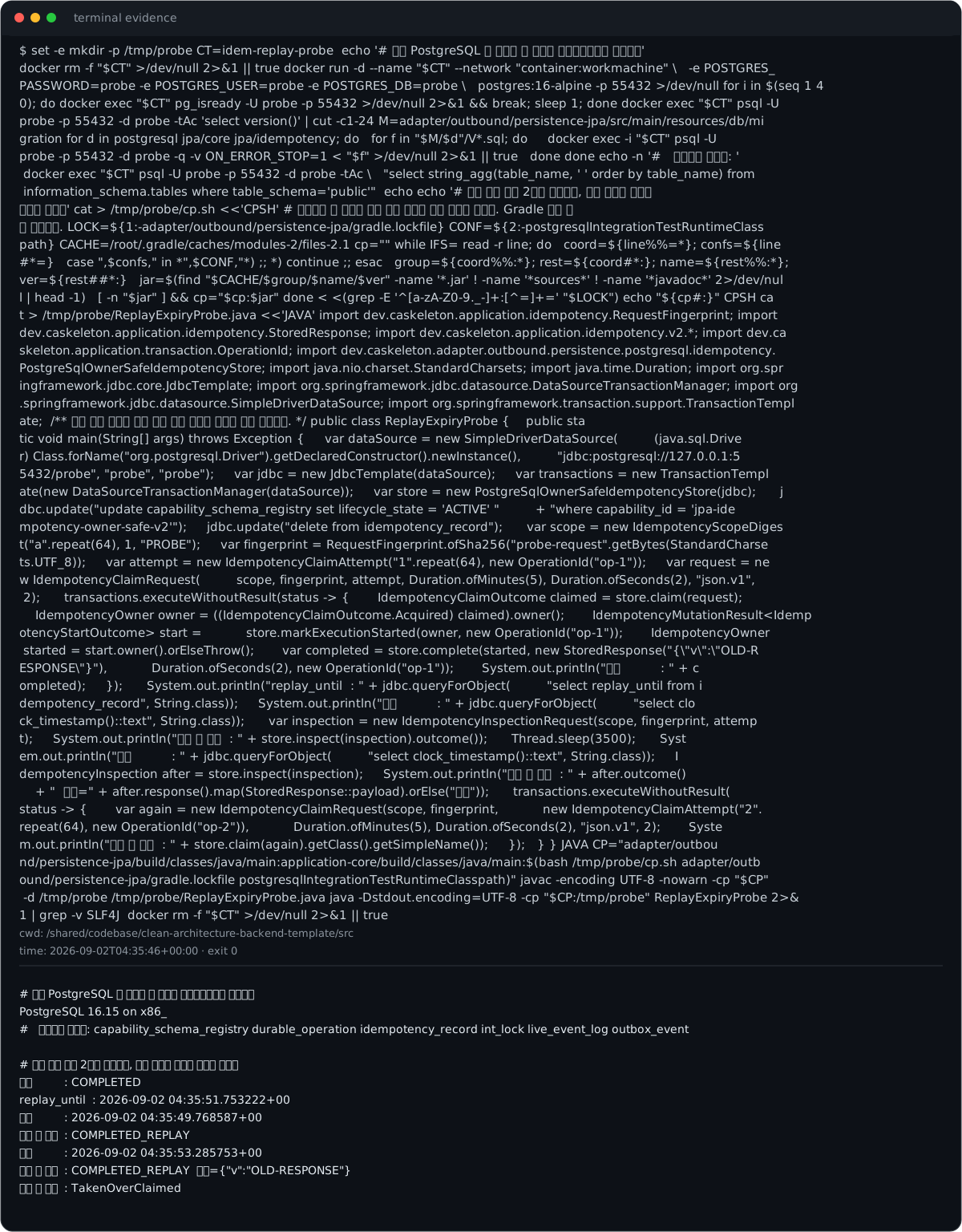
Recorded rather than papered over: only three of the 28 diagrams were
remade. The repository forbids hand-drawn SVG and forbids titles inside the
canvas; all 28 originals carry both, so converting them is redrawing, not
reformatting. They stay in source/ and the gap is written into the document.

verify-pipeline.py passes. audit-records.py reports no issues.

Co-Authored-By: Claude Opus 5 <noreply@anthropic.com>
140 lines
12 KiB
XML
140 lines
12 KiB
XML


<svg xmlns="http://www.w3.org/2000/svg" width="1200" height="1536" viewBox="0 0 1200 1536" role="img">
|
|
<title>terminal evidence</title>
|
|
<desc>Terminal-style rendering generated from retained command output. Sensitive-looking values are redacted in the visual asset.</desc>
|
|
<rect x="1" y="1" width="1198" height="1534" rx="14" fill="#0d1117" stroke="#30363d"/>
|
|
<rect x="1" y="1" width="1198" height="44" rx="14" fill="#161b22"/>
|
|
<rect x="1" y="30" width="1198" height="14" fill="#161b22"/>
|
|
<circle cx="24" cy="22" r="6" fill="#ff5f57"/>
|
|
<circle cx="44" cy="22" r="6" fill="#febc2e"/>
|
|
<circle cx="64" cy="22" r="6" fill="#28c840"/>
|
|
<text x="92" y="27" fill="#8b949e" font-size="14" font-family="ui-monospace, SFMono-Regular, Menlo, Consolas, monospace">terminal evidence</text>
|
|
<text x="24" y="68" fill="#c9d1d9" font-size="15" font-family="ui-monospace, SFMono-Regular, Menlo, Consolas, monospace" xml:space="preserve"><tspan x="24" dy="0">$ set -e
|
|
mkdir -p /tmp/probe
|
|
CT=idem-replay-probe
|
|
|
|
echo '# 실제 PostgreSQL 을 세우고 이 리프의 마이그레이션을 적용한다'
|
|
</tspan><tspan x="24" dy="22">docker rm -f "$CT" >/dev/null 2>&1 || true
|
|
docker run -d --name "$CT" --network "container:workmachine" \
|
|
-e POSTGRES_</tspan><tspan x="24" dy="22">PASSWORD=probe -e POSTGRES_USER=probe -e POSTGRES_DB=probe \
|
|
postgres:16-alpine -p 55432 >/dev/null
|
|
for i in $(seq 1 4</tspan><tspan x="24" dy="22">0); do docker exec "$CT" pg_isready -U probe -p 55432 >/dev/null 2>&1 && break; sleep 1; done
|
|
docker exec "$CT" psql -U </tspan><tspan x="24" dy="22">probe -p 55432 -d probe -tAc 'select version()' | cut -c1-24
|
|
M=adapter/outbound/persistence-jpa/src/main/resources/db/mi</tspan><tspan x="24" dy="22">gration
|
|
for d in postgresql jpa/core jpa/idempotency; do
|
|
for f in "$M/$d"/V*.sql; do
|
|
docker exec -i "$CT" psql -U </tspan><tspan x="24" dy="22">probe -p 55432 -d probe -q -v ON_ERROR_STOP=1 < "$f" >/dev/null 2>&1 || true
|
|
done
|
|
done
|
|
echo -n '# 만들어진 테이블: '</tspan><tspan x="24" dy="22">
|
|
docker exec "$CT" psql -U probe -p 55432 -d probe -tAc \
|
|
"select string_agg(table_name, ' ' order by table_name) from</tspan><tspan x="24" dy="22"> information_schema.tables where table_schema='public'"
|
|
|
|
echo
|
|
echo '# 재생 유효 기간 2초로 완료하고, 만료 전후로 조회와 </tspan><tspan x="24" dy="22">청구를 부른다'
|
|
cat > /tmp/probe/cp.sh <<'CPSH'
|
|
# 락파일의 한 구성에 실린 좌표 전부를 캐시 경로로 바꾼다. Gradle 실행 없</tspan><tspan x="24" dy="22">이 재현된다.
|
|
LOCK=${1:-adapter/outbound/persistence-jpa/gradle.lockfile}
|
|
CONF=${2:-postgresqlIntegrationTestRuntimeClass</tspan><tspan x="24" dy="22">path}
|
|
CACHE=/root/.gradle/caches/modules-2/files-2.1
|
|
cp=""
|
|
while IFS= read -r line; do
|
|
coord=${line%%=*}; confs=${line</tspan><tspan x="24" dy="22">#*=}
|
|
case ",$confs," in *",$CONF,"*) ;; *) continue ;; esac
|
|
group=${coord%%:*}; rest=${coord#*:}; name=${rest%%:*}; </tspan><tspan x="24" dy="22">ver=${rest##*:}
|
|
jar=$(find "$CACHE/$group/$name/$ver" -name '*.jar' ! -name '*sources*' ! -name '*javadoc*' 2>/dev/nul</tspan><tspan x="24" dy="22">l | head -1)
|
|
[ -n "$jar" ] && cp="$cp:$jar"
|
|
done < <(grep -E '^[a-zA-Z0-9._-]+:[^=]+=' "$LOCK")
|
|
echo "${cp#:}"
|
|
CPSH
|
|
ca</tspan><tspan x="24" dy="22">t > /tmp/probe/ReplayExpiryProbe.java <<'JAVA'
|
|
import dev.caskeleton.application.idempotency.RequestFingerprint;
|
|
import </tspan><tspan x="24" dy="22">dev.caskeleton.application.idempotency.StoredResponse;
|
|
import dev.caskeleton.application.idempotency.v2.*;
|
|
import dev.ca</tspan><tspan x="24" dy="22">skeleton.application.transaction.OperationId;
|
|
import dev.caskeleton.adapter.outbound.persistence.postgresql.idempotency.</tspan><tspan x="24" dy="22">PostgreSqlOwnerSafeIdempotencyStore;
|
|
import java.nio.charset.StandardCharsets;
|
|
import java.time.Duration;
|
|
import org.spr</tspan><tspan x="24" dy="22">ingframework.jdbc.core.JdbcTemplate;
|
|
import org.springframework.jdbc.datasource.DataSourceTransactionManager;
|
|
import org</tspan><tspan x="24" dy="22">.springframework.jdbc.datasource.SimpleDriverDataSource;
|
|
import org.springframework.transaction.support.TransactionTempl</tspan><tspan x="24" dy="22">ate;
|
|
|
|
/** 재생 유효 기간이 지난 완료 행을 조회와 청구에 각각 물어본다. */
|
|
public class ReplayExpiryProbe {
|
|
|
|
public sta</tspan><tspan x="24" dy="22">tic void main(String[] args) throws Exception {
|
|
var dataSource = new SimpleDriverDataSource(
|
|
(java.sql.Drive</tspan><tspan x="24" dy="22">r) Class.forName("org.postgresql.Driver").getDeclaredConstructor().newInstance(),
|
|
"jdbc:postgresql://127.0.0.1:5</tspan><tspan x="24" dy="22">5432/probe", "probe", "probe");
|
|
var jdbc = new JdbcTemplate(dataSource);
|
|
var transactions = new TransactionTempl</tspan><tspan x="24" dy="22">ate(new DataSourceTransactionManager(dataSource));
|
|
var store = new PostgreSqlOwnerSafeIdempotencyStore(jdbc);
|
|
|
|
j</tspan><tspan x="24" dy="22">dbc.update("update capability_schema_registry set lifecycle_state = 'ACTIVE' "
|
|
+ "where capability_id = 'jpa-ide</tspan><tspan x="24" dy="22">mpotency-owner-safe-v2'");
|
|
jdbc.update("delete from idempotency_record");
|
|
|
|
var scope = new IdempotencyScopeDiges</tspan><tspan x="24" dy="22">t("a".repeat(64), 1, "PROBE");
|
|
var fingerprint = RequestFingerprint.ofSha256("probe-request".getBytes(StandardCharse</tspan><tspan x="24" dy="22">ts.UTF_8));
|
|
var attempt = new IdempotencyClaimAttempt("1".repeat(64), new OperationId("op-1"));
|
|
var request = ne</tspan><tspan x="24" dy="22">w IdempotencyClaimRequest(
|
|
scope, fingerprint, attempt, Duration.ofMinutes(5), Duration.ofSeconds(2), "json.v1",</tspan><tspan x="24" dy="22"> 2);
|
|
|
|
transactions.executeWithoutResult(status -> {
|
|
IdempotencyClaimOutcome claimed = store.claim(request);
|
|
</tspan><tspan x="24" dy="22"> IdempotencyOwner owner = ((IdempotencyClaimOutcome.Acquired) claimed).owner();
|
|
IdempotencyMutationResult<Idemp</tspan><tspan x="24" dy="22">otencyStartOutcome> start =
|
|
store.markExecutionStarted(owner, new OperationId("op-1"));
|
|
IdempotencyOwner</tspan><tspan x="24" dy="22"> started = start.owner().orElseThrow();
|
|
var completed = store.complete(started, new StoredResponse("{\"v\":\"OLD-R</tspan><tspan x="24" dy="22">ESPONSE\"}"),
|
|
Duration.ofSeconds(2), new OperationId("op-1"));
|
|
System.out.println("완료 : " + c</tspan><tspan x="24" dy="22">ompleted);
|
|
});
|
|
|
|
System.out.println("replay_until : " + jdbc.queryForObject(
|
|
"select replay_until from i</tspan><tspan x="24" dy="22">dempotency_record", String.class));
|
|
System.out.println("지금 : " + jdbc.queryForObject(
|
|
"select clo</tspan><tspan x="24" dy="22">ck_timestamp()::text", String.class));
|
|
|
|
var inspection = new IdempotencyInspectionRequest(scope, fingerprint, attemp</tspan><tspan x="24" dy="22">t);
|
|
System.out.println("만료 전 조회 : " + store.inspect(inspection).outcome());
|
|
|
|
Thread.sleep(3500);
|
|
|
|
Syst</tspan><tspan x="24" dy="22">em.out.println("지금 : " + jdbc.queryForObject(
|
|
"select clock_timestamp()::text", String.class));
|
|
I</tspan><tspan x="24" dy="22">dempotencyInspection after = store.inspect(inspection);
|
|
System.out.println("만료 후 조회 : " + after.outcome()
|
|
</tspan><tspan x="24" dy="22"> + " 응답=" + after.response().map(StoredResponse::payload).orElse("없음"));
|
|
|
|
transactions.executeWithoutResult(</tspan><tspan x="24" dy="22">status -> {
|
|
var again = new IdempotencyClaimRequest(scope, fingerprint,
|
|
new IdempotencyClaimAttempt("2".</tspan><tspan x="24" dy="22">repeat(64), new OperationId("op-2")),
|
|
Duration.ofMinutes(5), Duration.ofSeconds(2), "json.v1", 2);
|
|
Syste</tspan><tspan x="24" dy="22">m.out.println("만료 후 청구 : " + store.claim(again).getClass().getSimpleName());
|
|
});
|
|
}
|
|
}
|
|
JAVA
|
|
CP="adapter/outbou</tspan><tspan x="24" dy="22">nd/persistence-jpa/build/classes/java/main:application-core/build/classes/java/main:$(bash /tmp/probe/cp.sh adapter/outb</tspan><tspan x="24" dy="22">ound/persistence-jpa/gradle.lockfile postgresqlIntegrationTestRuntimeClasspath)"
|
|
javac -encoding UTF-8 -nowarn -cp "$CP"</tspan><tspan x="24" dy="22"> -d /tmp/probe /tmp/probe/ReplayExpiryProbe.java
|
|
java -Dstdout.encoding=UTF-8 -cp "$CP:/tmp/probe" ReplayExpiryProbe 2>&</tspan><tspan x="24" dy="22">1 | grep -v SLF4J
|
|
|
|
docker rm -f "$CT" >/dev/null 2>&1 || true</tspan></text>
|
|
<text x="24" y="1168" fill="#8b949e" font-size="13" font-family="ui-monospace, SFMono-Regular, Menlo, Consolas, monospace" xml:space="preserve"><tspan x="24" dy="0">cwd: /shared/codebase/clean-architecture-backend-template/src</tspan></text>
|
|
<text x="24" y="1190" fill="#8b949e" font-size="13" font-family="ui-monospace, SFMono-Regular, Menlo, Consolas, monospace" xml:space="preserve"><tspan x="24" dy="0">time: 2026-09-02T04:35:46+00:00 · exit 0</tspan></text>
|
|
<line x1="24" y1="1204" x2="1176" y2="1204" stroke="#30363d"/>
|
|
<text x="24" y="1244" fill="#e6edf3" font-size="14" font-family="ui-monospace, SFMono-Regular, Menlo, Consolas, monospace" xml:space="preserve"><tspan x="24" dy="0"># 실제 PostgreSQL 을 세우고 이 리프의 마이그레이션을 적용한다</tspan></text>
|
|
<text x="24" y="1266" fill="#e6edf3" font-size="14" font-family="ui-monospace, SFMono-Regular, Menlo, Consolas, monospace" xml:space="preserve"><tspan x="24" dy="0">PostgreSQL 16.15 on x86_</tspan></text>
|
|
<text x="24" y="1288" fill="#e6edf3" font-size="14" font-family="ui-monospace, SFMono-Regular, Menlo, Consolas, monospace" xml:space="preserve"><tspan x="24" dy="0"># 만들어진 테이블: capability_schema_registry durable_operation idempotency_record int_lock live_event_log outbox_event</tspan></text>
|
|
<text x="24" y="1310" fill="#e6edf3" font-size="14" font-family="ui-monospace, SFMono-Regular, Menlo, Consolas, monospace" xml:space="preserve"><tspan x="24" dy="0"></tspan></text>
|
|
<text x="24" y="1332" fill="#e6edf3" font-size="14" font-family="ui-monospace, SFMono-Regular, Menlo, Consolas, monospace" xml:space="preserve"><tspan x="24" dy="0"># 재생 유효 기간 2초로 완료하고, 만료 전후로 조회와 청구를 부른다</tspan></text>
|
|
<text x="24" y="1354" fill="#e6edf3" font-size="14" font-family="ui-monospace, SFMono-Regular, Menlo, Consolas, monospace" xml:space="preserve"><tspan x="24" dy="0">완료 : COMPLETED</tspan></text>
|
|
<text x="24" y="1376" fill="#e6edf3" font-size="14" font-family="ui-monospace, SFMono-Regular, Menlo, Consolas, monospace" xml:space="preserve"><tspan x="24" dy="0">replay_until : 2026-09-02 04:35:51.753222+00</tspan></text>
|
|
<text x="24" y="1398" fill="#e6edf3" font-size="14" font-family="ui-monospace, SFMono-Regular, Menlo, Consolas, monospace" xml:space="preserve"><tspan x="24" dy="0">지금 : 2026-09-02 04:35:49.768587+00</tspan></text>
|
|
<text x="24" y="1420" fill="#e6edf3" font-size="14" font-family="ui-monospace, SFMono-Regular, Menlo, Consolas, monospace" xml:space="preserve"><tspan x="24" dy="0">만료 전 조회 : COMPLETED_REPLAY</tspan></text>
|
|
<text x="24" y="1442" fill="#e6edf3" font-size="14" font-family="ui-monospace, SFMono-Regular, Menlo, Consolas, monospace" xml:space="preserve"><tspan x="24" dy="0">지금 : 2026-09-02 04:35:53.285753+00</tspan></text>
|
|
<text x="24" y="1464" fill="#e6edf3" font-size="14" font-family="ui-monospace, SFMono-Regular, Menlo, Consolas, monospace" xml:space="preserve"><tspan x="24" dy="0">만료 후 조회 : COMPLETED_REPLAY 응답={"v":"OLD-RESPONSE"}</tspan></text>
|
|
<text x="24" y="1486" fill="#e6edf3" font-size="14" font-family="ui-monospace, SFMono-Regular, Menlo, Consolas, monospace" xml:space="preserve"><tspan x="24" dy="0">만료 후 청구 : TakenOverClaimed</tspan></text>
|
|
</svg>
|